Tokens
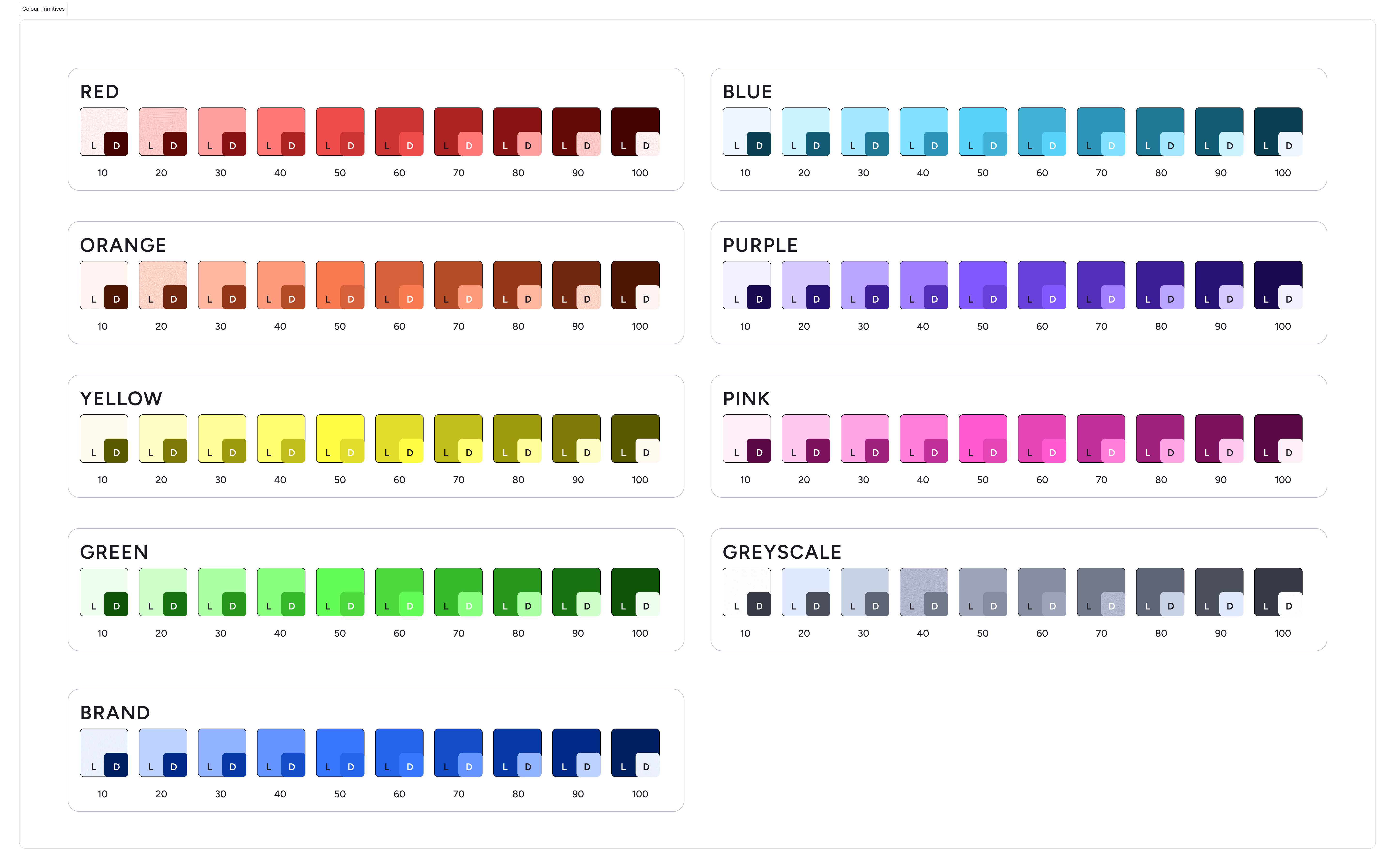
Color Primitives (The Raw Palette)
Color Usage defines the semantic layer of the design system. Unlike Primitives, which describe what a color looks like (e.g., Blue-60), Usage tokens describe how a color functions (e.g., Background-Brand-Primary).
Why we use it:
This abstraction layer allows us to map a single token name to different raw values depending on the context. It is the architectural foundation that enables instant, system-wide theming (Light/Dark mode) and ensures accessible contrast ratios across all products without manual overrides.
Naming Convention:
All semantic tokens follow a strict taxonomy: Category (Background) — Group (Neutral) — State/Role (Primary)
The Palette Structure:
Greyscale (Neutral Foundation):
Range:
Grey-10toGrey-100.Key Values:
Grey-10(F7F8FA) is used for subtle backgrounds, whileGrey-100(353B47) serves as the primary text anchor. Pure black is avoided to reduce eye strain.
Brand Blue (Core Identity):
Range:
Brand-10toBrand-100.Key Value:
Brand-50(3776FF) andBrand-60(2563EB) function as the accessible baseline for primary interactions.
System Feedback (Semantic Hues):
Green (Success): Ranging from
Green-10(Mint) toGreen-100(Forest), used for positive confirmation and growth metrics.Red (Critical): Ranging from
Red-10toRed-100, used for destructive actions and error states.Orange (Warning): Ranging from
Orange-10toOrange-100, used for "In Progress" states and non-blocking alerts.Blue (Info): Ranging from
Blue-10toBlue-100, used for "Information" states.
Accent Hues (Data Visualization):
Pink, Purple, Yellow: A broad spectrum designed specifically for charts, graphs, and sector tagging where high distinction is required between data points.
Usage Guideline:
Do Not Use Directly: Designers should rarely reference a Primitive (e.g.,
Purple-50) directly in a mockup. Always map it to a Semantic Token (e.g.,Chart-Data-3) to ensure theming capabilities.
Naming Convention:
Conclusion
This page introduced JavaScript syntax, variables, data types, and operators. In the next section, we will explore control flow structures like conditionals and loops to build more complex logic.
Join our Community Forum
Any other questions? Get in touch